Search
  Sign Up
  VIP Club
Cashy Casino App: Mobile Play on Android & iOS
There’s no native app on Google Play or the App Store; Cashy Crypto Casino runs entirely in the browser instead. Rather than deal with app store restrictions, players add a Progressive Web App (PWA) shortcut to their screen through Chrome or Safari. That’s really all it takes to get into Cashy Casino mobile play or request a crypto payout on the go; no download required.
| Platform | Access Method | Store Availability | Install Required | Full Feature Access |
|---|---|---|---|---|
| Android | Mobile browser / PWA shortcut | Not on Google Play | No (optional PWA shortcut) | Yes |
| iOS | Safari browser / PWA shortcut | Not on App Store | No (optional PWA shortcut) | Yes |
| Desktop | Web browser / Chrome PWA | Direct website | No (optional desktop shortcut) | Yes |
Does Cashy Casino Have a Mobile App?
Short answer: no. There’s no Cashy Casino app to download from popular online stores. What runs instead is a PWA, a shortcut that opens in your browser but behaves like a standalone app once it’s on your home screen. No APK updates to chase, no extra battery drain and the lobby, live feeds and cashier all work the same as they do on desktop.
| Feature / Aspect | Progressive Web App (PWA) | Native App |
|---|---|---|
| Installation source | Browser “Add to Home Screen” option | Google Play Store / Apple App Store |
| Storage use | ~1–2 MB browser cache | Heavy (often 100–300+ MB) |
| Manual updates needed | Never (Updates automatically on every page refresh) | Required regularly through app stores or file builds |
| Device compatibility | Works on any modern iOS or Android browser | Dependent on OS software version minimums |
| Full lobby access | Complete 7,000+ title catalog without regional blocks | Often restricted or missing games due to store policies |
How to Download Cashy Casino App: All Platforms
Getting set up takes under a minute, though the exact steps change depending on whether you’re on Chrome for Android, Safari for iOS or a desktop browser.
APK Download and Install Cashy Casino Android
- Open Chrome on your Android device and go to the official site.
- Tap the three dots in the top right.
- Choose Add to Home Screen; this is the same as download Cashy Casino.
- Confirm, and the icon lands on your home grid.
Stick to the official domain when doing this. If some third-party site is offering a standalone APK instead, run it through antivirus software first; better safe than sorry.
Add PWA to Home iOS Screen
Apple restricts real-money casino apps in most unregulated regions, so Safari PWAs are really the only practical route for iPhone and iPad users. It feels like a normal Cashy Casino app without taking up storage or needing separate updates.
- Open Safari and go to the homepage.
- Tap Share at the bottom, the box with the upward arrow.
- Scroll down and select Add to Home Screen.
- Tap Add in the top right and the shortcut saves to your home screen.
This only works through Safari. Chrome or Firefox on iOS won’t show the option. Push notifications require iOS 16.4 or newer; anything older still runs fine, just without live alerts.
Cashy Casino App Features
The Cashy Casino mobile interface matches the desktop version feature for feature: the same games, the same streams and the same security.
| Feature | Details |
|---|---|
| Game library | Over 7,000 Cashy Casino mobile-optimized slots, instant crash games and table titles |
| Live casino | 100+ HD streams running at 60 FPS covering roulette, blackjack and game shows |
| Payments | Instant crypto gateway support (BTC, ETH, LTC, USDT) plus direct web e-wallets |
| Security | 256-bit SSL encryption, Google 2FA support and biometric login integration |
| Responsible gambling | Self-service deposit caps, session alerts and cooling-off triggers |
| Performance | Ultra-light browser rendering with a built-in “Low-Bandwidth Mode” for mobile data |
| User interface | One-handed vertical orientation with live RTP displays on game cards |
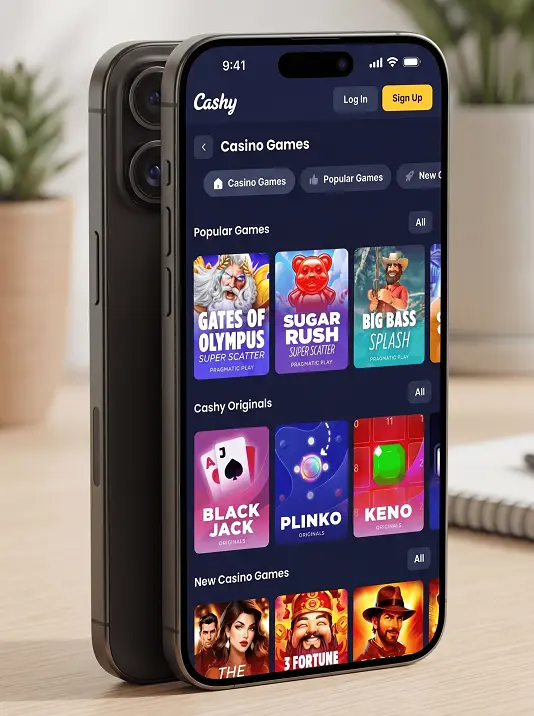
Mobile Game Selection
Category tabs for Slots, Live Casino, Table Games, Originals and Game Providers make browsing simple on a small screen. A few titles stand out on Cashy Casino mobile specifically:
- Aviator (Spribe): crash multipliers built around a single-tap cashout.
- Gates of Olympus (Pragmatic Play): a tumbling slot that scales cleanly to portrait mode.
- Sweet Bonanza (Pragmatic Play): bonus-buy mechanics that work well with touch.
- Plinko (Cashy Originals): quick, instant-win rounds, good for short sessions on mobile data.
- Lightning Roulette (Evolution): live dealer wheel with simple tap-to-bet controls.
App vs. Browser — What’s Better for You
Both routes get you to the same library; the difference comes down to convenience, not access. Even though the Cashy Casino app is not available yet, the PWA launches with the same speed and offers the same range of functionality.
| Operational Metric | PWA Home Screen Shortcut | Standard Mobile Browser |
|---|---|---|
| Launch speed | One-tap launch directly from the home screen | Open browser, type URL or find saved bookmark |
| Display area | Full screen without browser address bars in the way | Standard browser layout with top and bottom menu bars |
| Session memory | Remembers login session via browser cache | May require signing in again if tabs are closed |
| Storage impact | ~2–5 MB cache footprint | Stored within general mobile browser data |
Mobile Security and Data Protection
Playing on a phone doesn’t make your balance any less secure than playing on a desktop; deposits and withdrawals still run through 256-bit SSL encryption. Managing money is actually easier on Cashy Casino mobile, since your crypto wallet or banking app usually lives on the same device: copy a wallet address, approve a transfer, done. Face ID and fingerprint unlock are also available if you want a faster, still-secure way to sign in.
Troubleshooting and Common App Installation Issues
Most issues when you download Cashy Casino as a home screen shortcut come down to browser quirks, and they clear up in a step or two.
| Issue | Platform | Cause | Fix |
|---|---|---|---|
| “Add to Home Screen” missing | iOS | Browsing in Chrome or Firefox instead of Safari | Open the site in Safari to access the correct share menu |
| Blank screen on launch | Android / iOS | Corrupted browser cache or weak mobile signal | Clear browser cookies/cache or toggle airplane mode to refresh data connection |
| Shortcut disappears | Android | Device storage cleanup or launcher update | Re-open Chrome and add the PWA shortcut to the home screen again |
| Live stream stuttering | All platforms | High background network usage | Enable “Low-Bandwidth Mode” in settings or switch from mobile data to Wi-Fi |
FAQ
Is there a Cashy Casino app to download?
No. There's no native app on Google Play or the App Store — the platform runs entirely in the browser. Instead, players add a Progressive Web App (PWA) shortcut to their home screen through Chrome or Safari, which behaves like a standalone app without any store download.
How do I add Cashy Casino to my home screen on Android?
Open Chrome, go to the official site, tap the three dots in the top right, then choose Add to Home Screen and confirm. The icon lands on your home grid and opens like a standalone app. Stick to the official domain — if a third-party site offers a separate APK file instead, run it through antivirus software first.
How do I add Cashy Casino to my home screen on iOS?
Open Safari, go to the homepage, tap Share at the bottom, scroll down and select Add to Home Screen, then tap Add in the top right. This only works through Safari — Chrome or Firefox on iOS won't show the option. Push notifications require iOS 16.4 or newer; older versions still work, just without live alerts.
What's the difference between the PWA and a native app?
The PWA uses about 1–2 MB of browser cache versus 100–300+ MB for a typical native app, updates automatically on every page refresh instead of needing manual updates through an app store, and gives full access to the entire 7,000+ title catalog without regional store restrictions.
Is playing on the mobile PWA as secure as desktop?
Yes. Deposits and withdrawals run through the same 256-bit SSL encryption on mobile as on desktop, with Google 2FA support and biometric login (Face ID/fingerprint) available for faster, still-secure sign-in. Managing funds is often easier on mobile since your crypto wallet or banking app is usually on the same device.